




Skip to content

CHAZON · Discover

Where do you want to go?

CHAZON · BU-14Chazon.eu Tour · The Message 2026

MP4 · 720p · Subtitles · German

Open Beta 1.0 · open source

Chazon OS arrives Friday.

An operating system with its own desktop and its own programs for media, office work, games and assistance. It is built on Ubuntu 26.04 LTS and it is yours: no account, no credentials of ours, free to build on.

This is a beta: usable, but not finished. There will be bugs. Back up what matters first. It is too early for the one machine everything depends on.

From Friday, 16 October 2026ISO, checksum and signature will appear here How to install
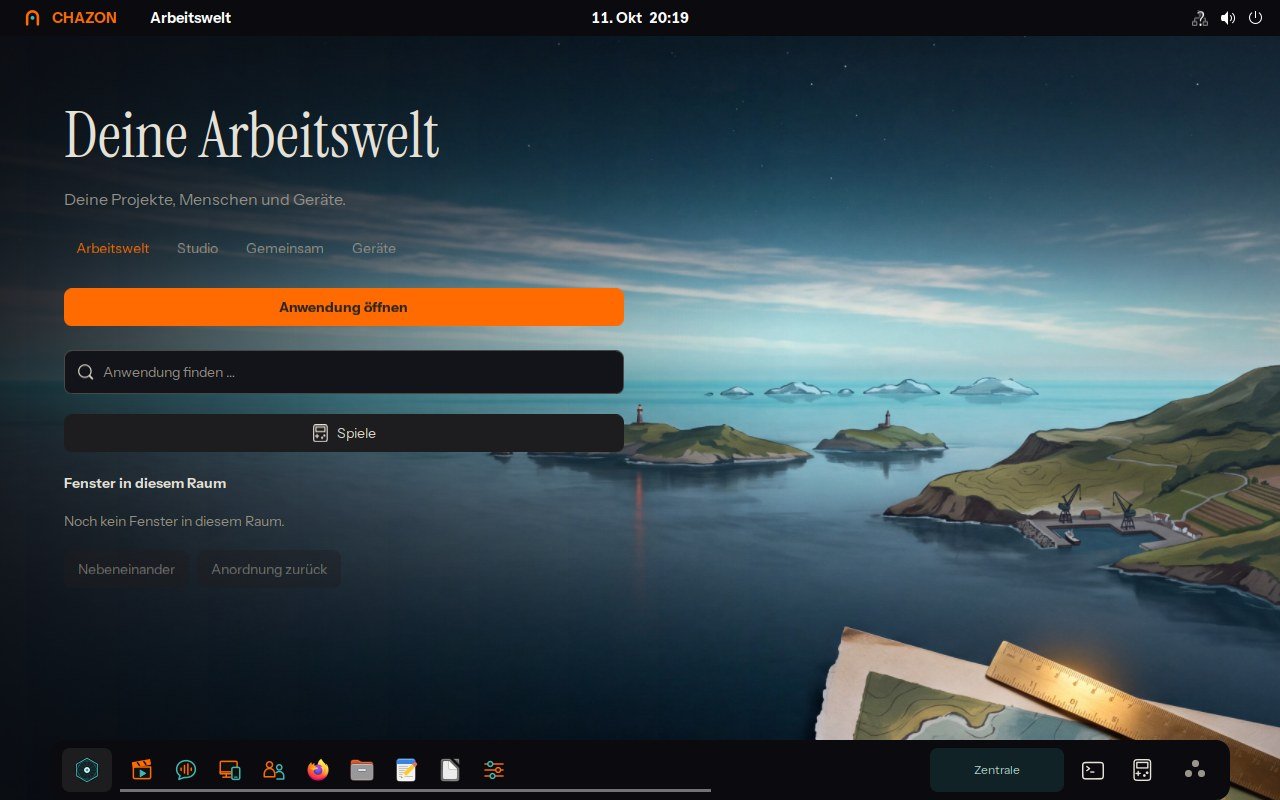
The Chazon OS desktop after first login (screenshot from VM acceptance testing)
Cover of the music video “Copy of Me”: wind-up robots at the copier, paper flying Copy of Me · The robot musical

The launch film

Seven wind-up robots, twenty centimetres tall, shoot their own music video at night. It ends on a date: Friday, 16 October 2026.

The video is published with the release.

01What it is

Chazon OS is Ubuntu 26.04 LTS with its own working environment and its own programs: a studio for images, film and editing, office tools, an assistant, games and a sound studio. Underneath, Ubuntu runs unchanged; its programs and package sources stay available.

  • Nothing is set up in advance. The ISO contains no accounts, no credentials and no keys of ours. You add what you want to use yourself – or you do not.
  • Usable offline. Installation and the basics need no connection. Anything that needs an outside service or a large local model says so where it matters.
  • With AI or without. During setup you choose: subscription, your own key, a local model – or no AI at all.
  • Free to build on. The source is open and the build instructions are included. If you pass on a modified version, give it a name of its own.

02Install

Every path goes through a USB stick: the ISO is written to it and the computer starts from it. Pick the system you are sitting at right now.

Windows10 or 11

Chazon stick writer · in progress

By hand

  1. Download the ISO and compare the checksum (section “Verify”).
  2. Plug in a stick of at least 16 GB. It will be overwritten completely.
  3. Write it with Rufus; when asked, choose “Write in DD Image mode”.
  4. Restart and open the boot menu while powering on (usually F12, F2 or Esc).

Windows can stay beside it if the installer offers that and you choose it. Back up first.

macOSMacs with an Intel processor

Chazon stick writer · in progress

By hand

  1. Download the ISO, verify in Terminal: shasum -a 256, then compare.
  2. Plug in the stick and write it with balenaEtcher.
  3. Restart, hold the Option key (⌥) and pick the stick.

Macs with Apple silicon (M1 and later) cannot start this version: it is built for x86-64. You can still write a stick for a PC there.

Linuxany distribution

Chazon stick writer · in progress

By hand

  1. Download the ISO, verify with sha256sum -c and gpg --verify.
  2. “Disks” → stick → “Restore Disk Image”, or dd in a terminal.
  3. Restart and boot from the stick.

Just looking? The ISO also starts in a virtual machine (UEFI, 4 GB of memory).

From the stickthe stick is ready

  1. Switch the computer on with the stick plugged in and open the boot menu.
  2. Choose the language in the Chazon menu: Deutsch or English.
  3. “Set up Chazon OS” comes first, then the installer.
  4. The installer asks where to install. “Erase disk” erases that disk.

Trying it without installing works too: the live session does not change the disk.

Chazon stick writer: Downloads the ISO, verifies checksum and signature and writes the stick – one program, one path.

03What you need

Computer64-bit PC (x86-64), UEFI or BIOS
Memory4 GB are recommended; 8 GB or more for Studio, games and a local AI model.
Disk16 GB are in use after installation. Plan for at least 30 GB, clearly more with your own projects.
GraphicsSo far only the virtual graphics of a VM were tested. Real graphics cards – including NVIDIA under Wayland – have not been tested with this version yet.
USB stickat least 16 GB

04Verify

The checksum shows the file arrived complete. The signature shows that checksum and file come from us. Both together take two minutes.

1. Checksum

Put ISO, checksum and signature into one folder, then there:

sha256sum -c CHAZON-open-beta-1.0.iso.sha256

It must end with OK. Windows (PowerShell): Get-FileHash. macOS: shasum -a 256.

2. Signature

gpg --import chazon-release-key.asc
gpg --verify CHAZON-open-beta-1.0.iso.sha256.asc \
             CHAZON-open-beta-1.0.iso.sha256

gpg must report “Good signature” and name this fingerprint:

9451 69F4 2E17 289D E49E 15D5 B3CF 3724 DB29 57B5

The warning that the key is not certified is normal: gpg does not know us. What counts is that the fingerprint matches character by character.

05Updates

After installation, updates of the Chazon programs come from our own package source, over HTTPS and signed with the same key as the ISO. Ubuntu's updates keep coming from Ubuntu; both run side by side through the usual updater.

https://pakete.chazon.eu/

The Chazon source can be switched off: in the welcome window, in Settings under “Programs”, or in a terminal with sudo chazon-quelle aus. chazon-quelle status shows the state.

06Package state

Chazon OS consists of 43 packages of its own on Ubuntu 26.04 LTS. They live in the package source (suite open-beta).

System 15
chazon-core1.0.0~beta6The chazon command, access checks, local MCP adapter
chazon-shell1.0.0~beta6System centre with Ori, agents and a resident terminal
chazon-session1.0.0~beta6Login and session in the Chazon look
chazon-branding1.0.0~beta6System name, mark and defaults
chazon-boot-theme1.0.0~beta6Boot artwork
chazon-theme1.0.0~beta6Look of the programs around Chazon
chazon-icons1.0.0~beta676 drawn app icons
chazon-fonts1.0.0~beta6Instrument Sans, Instrument Serif, Geist Mono
chazon-world-media1.0.0~beta6Moving backdrops, one loop per room
chazon-firstlogin1.0.0~beta6Sets up your work world at first login
chazon-einstellungen1.0.0~beta6Appearance, shelf, Ori, access keys and programs in one place
chazon-rescue1.0.0~beta6Rescue path: status, stock look, offline repair, backup
chazon-archive-keyring1.0.0~beta6Key and address of the Chazon package source
chazon-language-english1.0.0~beta6Second system language: English
chazon-legal1.0.0~beta6Licences, trademark statement, third-party overview
Work 11
chazon-studio-native1.0.0~beta6Studio: workbench for image, film and editing
chazon-studio-engine1.0.0~beta6The Studio's image engine (preview and compositing on the GPU)
chazon-tonstudio0.4.48Recording, instruments, singing bowls
chazon-office1.0.0~beta6LibreOffice in the Chazon look
chazon-business1.0.0~beta6Ledger, e-invoices, accounts, work table
chazon-finance1.0.0~beta6Budgets, paper trading, simulation
chazon-dateien1.0.0~beta6Chazon menu in the file manager
chazon-connect1.0.0~beta6Connect and share devices
chazon-gemeinsam1.0.0~beta6End-to-end encrypted exchange (Matrix), by invitation
chazon-universe1.0.0~beta6Map of your sites, sources, builds and backups
chazon-sources1.0.0~beta6Catalogue of public sources with provenance
Assistance 7
chazon-assistant1.0.0~beta6Assistant sessions and workspace preferences
chazon-orchester1.0.0~beta6Workflows as checkable plans, a human decides before money
chazon-speech-local1.0.0~beta6Dictation on your own machine (Whisper)
chazon-hermes-runtime0.21.4+chazon1~beta1Runtime of the Hermes agent, pinned version
chazon-skillspector2.11.2+chazon1~beta1Offline check of extensions
chazon-skill-service1.0.0~beta6Confined service for that check
chazon-extension-workshop1.0.0~beta6Workshop for your own extensions
Games 8
chazon-alchemy0.2.5Falling-block game of the elements
chazon-battlegrounds0.3.2-1The Revue: auto-battler on a puppet stage
chazon-harmonie1.0.5Strategic garden game
chazon-lichtflut1.2.5Turf battle of light
chazon-morgenhain1.2.4Cosy farm and life simulator
chazon-souls1.2.4Co-op boss fight for 1–4
chazon-sternenwerk1.0.2-1Real-time strategy
chazon-gaming1.0.0~beta6Starters for Steam and Battle.net
Runtimes 2
chazon-node24.21.0-3Node.js for Chazon programs
chazon-python3123.12.3+ubuntu0.17-2Python 3.12 for Chazon programs

This list is generated from the manifest of the release and rewritten with every update of the source.

07History

  1. Open Beta 1.0planned
    First public version: ISO, package source and source code.

From the release on, every update of the package source is listed here: date, changed packages, what changes for you.

08Explainer videos

Install in ten minutes

coming

The desktop: a tour

coming

Connect your own AI – or none

coming

Studio: from image to film

coming

Updates and the Chazon package source

coming

Rescue, when something is stuck

coming

09Known limits

  • Tested in virtual machines (UEFI and BIOS, German and English, online and offline). Not yet widely tested on real hardware: graphics cards, audio and microphone, Wi-Fi, installing beside another system, disk encryption.
  • Macs with Apple silicon and other ARM computers: this version is built for x86-64 only.
  • The installer is Ubuntu's installer: its body texts say “Ubuntu”. This is compiled into it.
  • Blender, a local AI model and the web Studio are not included; Blender and Ollama can be installed afterwards.
  • Chazon services (Together, online games) are off after setup until you switch them on; Together by invitation only.
  • Games and the sound studio are German only; interface, Settings, Assistant, Ori and setup are German and English.

10Licence and source

  • Our own code: MIT.
  • Designed content (characters, images, films, sounds, texts): Creative Commons Attribution-ShareAlike 4.0 (CC BY-SA 4.0).
  • The name and mark “Chazon” are not licensed along. Unmodified ISOs and packages may be passed on under their name; modified versions need a name of their own.
  • Third-party parts keep their licence: Ubuntu and its packages, the bundled runtimes and models, the fonts (SIL OFL 1.1).

Source code and build instructions: are published with the release.

“Ubuntu” is a trademark of Canonical Ltd.; Chazon OS is not a Canonical product and is not supported by Canonical. Whether distributing a modified Ubuntu ISO meets Canonical's trademark rules in every point has not been legally reviewed. This is not legal advice.